

If you run a WooCommerce store in a market where Cash on Delivery is still the preferred payment method, you already know the biggest problem: people want to buy, but they quit before they finish checkout. Long forms, extra cart steps, and slow page loads create friction at the exact moment when impulse buying should be easiest.
That is where COD Checkout Pro comes in. This WooCommerce plugin is built to remove the usual checkout obstacles and replace them with a fast, product-page order experience that feels simple, mobile-friendly, and conversion-focused. Instead of sending visitors through a traditional cart flow, it lets them place a COD order with a streamlined form right where the buying decision happens.
In this review, we will take a close look at how COD Checkout Pro works, who it is for, what it does well, where it may not be ideal, and why it could be a smart upgrade for store owners who want more orders from the same traffic.
What Is COD Checkout Pro?
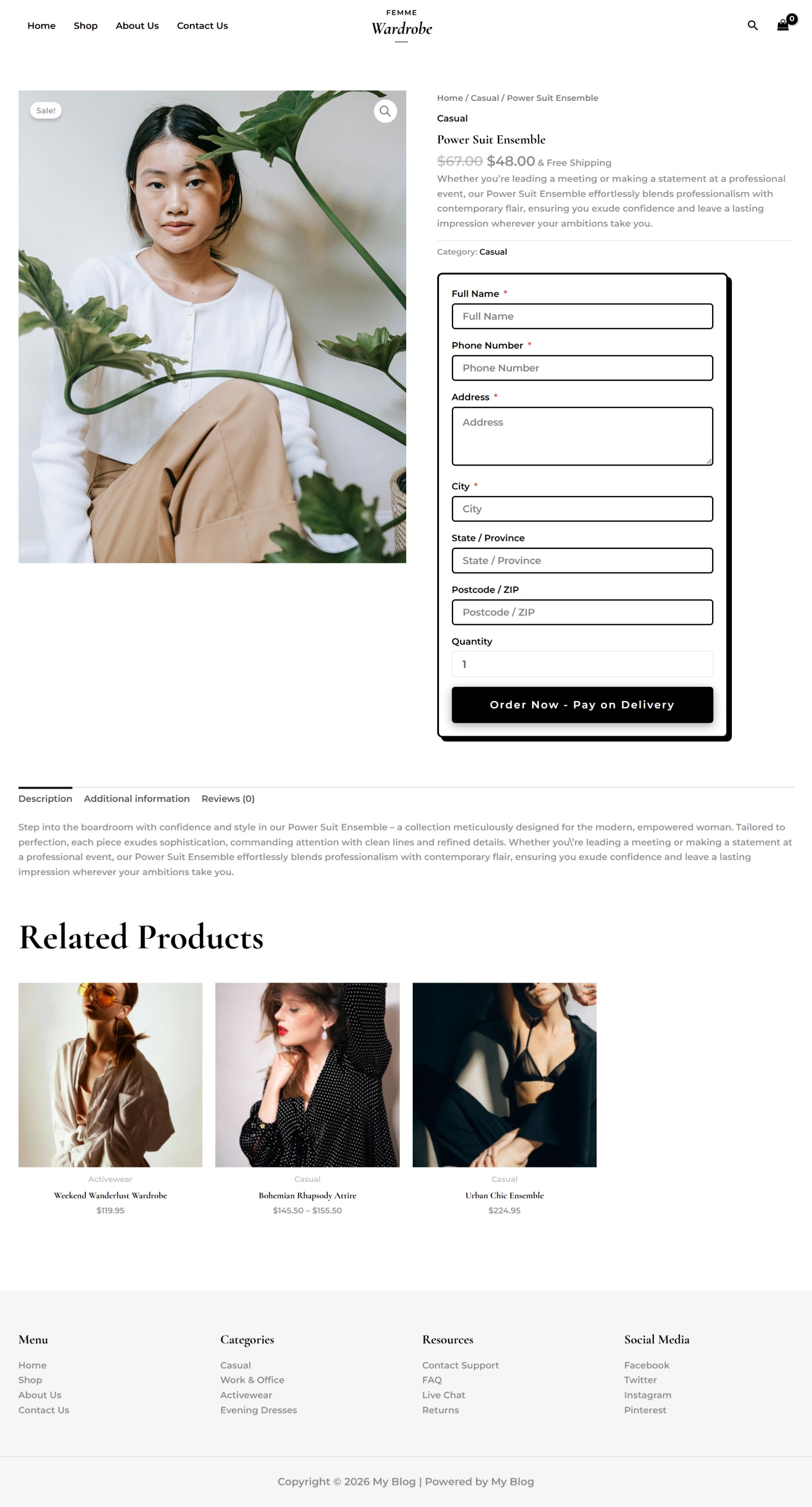
COD Checkout Pro is a WooCommerce plugin designed to simplify the ordering process for stores that rely on Cash on Delivery. Rather than making shoppers add items to a cart, move to another page, and fill out a lengthy checkout form, the plugin places a clean ordering form directly on the product page.
The idea is simple but powerful: reduce friction, reduce abandonment, and make it easier for customers to say yes. When the purchase path is shorter, customers are less likely to lose momentum. That can be especially valuable on mobile devices, where every extra click can lead to drop-off.
Why Traditional WooCommerce Checkout Can Hurt COD Sales
Standard WooCommerce checkout is often built for transactions that rely on cards, billing addresses, shipping details, and other formal steps. That may work for some markets, but it is not always the best structure for COD-heavy regions where speed matters more than complexity.
COD buyers are often impulsive buyers. They may discover your product on Facebook, Instagram, TikTok, or a mobile search result, decide quickly that they want it, and expect to order in seconds. If the process turns into a 3- to 5-minute sequence of pages and fields, the excitement fades and abandonment rises.
COD Checkout Pro addresses that problem directly by removing unnecessary steps and putting the order form exactly where customers need it most: on the product page, under the price, while buying intent is still high.
Key Features of COD Checkout Pro
1. One-Click Ordering on the Product Page
The core feature is the ability to let shoppers order without going to the cart. Customers see the product, enter the basic details needed for COD fulfillment, and confirm the order in a few seconds.
- Product-page order form
- No mandatory cart step
- No complex multi-page checkout
- Faster conversion path
2. Mobile-Friendly Design
Because a large share of COD traffic comes from mobile devices, the plugin focuses on a compact and responsive experience. That is a major advantage for traffic sourced from short-form video ads, mobile browsers, or social media campaigns.
- Optimized for small screens
- Easy tapping and scrolling
- Reduced layout clutter
- Better experience for mobile-first users
3. Customizable Fields
Not every store needs the same customer information. COD Checkout Pro lets you collect only the details you want, such as name, phone number, and address, helping you keep the form short and conversion-friendly.
- Flexible field collection
- Better control over lead data
- Less form fatigue
- Cleaner checkout experience
4. Variable Product Support
If your store sells products with sizes, colors, or other options, variable product support is a practical necessity. COD Checkout Pro is designed to work with variations so buyers can select what they want without being pushed into a complicated flow.
- Supports product variations
- Works with common WooCommerce setups
- Maintains a smooth purchase journey
5. Theme and Design Flexibility
The plugin includes pre-built theme options and customization controls, which is helpful if you want the order form to match your brand. That means you are not stuck with a generic look that clashes with your store design.
- Multiple templates
- Quick theme switching
- Brand-aligned styling
- Better visual consistency
6. No Monthly Subscription
Another appealing part of the offer is the pricing structure. Based on the product details, COD Checkout Pro is positioned as a one-time investment rather than a recurring SaaS expense. That can be attractive for store owners who want to improve conversions without adding another monthly bill.
How COD Checkout Pro Works
The workflow is intentionally short and straightforward. A visitor lands on your product page, sees the offer, and is presented with a clean COD form directly below the main product area. They enter the required information, click to confirm, and the order is submitted.
That short process matters because it preserves buying intent. Instead of making the customer think about navigation, carts, or multiple confirmation steps, you keep them focused on the product and the immediate action of ordering.
Benefits of Using COD Checkout Pro
Higher Conversion Rates
When you shorten the buying process, more visitors finish the purchase. This is the main promise of COD Checkout Pro, and it is easy to understand why it matters. Less friction usually means better conversion rates, especially in COD-driven markets.
Lower Cart Abandonment
Cart abandonment is one of the biggest profit leaks in e-commerce. By skipping the cart entirely, the plugin eliminates one of the most common drop-off points and can help capture customers who would otherwise leave before completing checkout.
Better Mobile Sales
Mobile shoppers tend to have less patience for long forms. COD Checkout Pro is built with that in mind, making it more likely that mobile traffic from ads and social platforms will turn into completed orders.
More Efficient Lead Collection
Because the order form can be simplified, you can focus on collecting the details that truly matter for fulfillment. This makes the process feel lighter for customers while still giving your team the information needed to ship successfully.
Strong Fit for COD Markets
The plugin is especially relevant for regions where COD remains a dominant payment method, including MENA, Southeast Asia, and LATAM. If your business serves those audiences, a streamlined COD flow can make a meaningful difference.
Best Use Cases for COD Checkout Pro
COD Checkout Pro is not a universal solution for every store, but it is a strong fit for businesses that depend on speed and simplicity.
- Cash on Delivery stores
- Dropshipping businesses
- Mobile-first product campaigns
- Local stores with direct-response offers
- Stores selling to COD-dominant countries
If your traffic comes from ads where impulse buying matters, the plugin can be especially useful because it reduces the number of decisions between interest and purchase.
EMBED Demo Video
Pros and Cons of COD Checkout Pro
Pros
- Removes cart friction and simplifies the checkout process
- Designed for COD-heavy markets and mobile buyers
- Supports variable products and custom fields
- Can improve conversion rates by shortening the order path
- Offers multiple themes and customization options
- No monthly subscription according to the offer details
Cons
- Best suited for COD stores, so it may not be ideal for all business models
- Store owners who want a traditional cart experience may not use it fully
- Conversion gains will still depend on traffic quality and offer strength
- Requires proper setup and testing to align with your store flow
Comparison: COD Checkout Pro vs. Traditional WooCommerce Checkout
Traditional WooCommerce checkout has its place, especially for stores that need a standard multi-step ecommerce flow. But if your main challenge is getting COD customers to finish orders, the classic model can be too slow and too demanding.
COD Checkout Pro is built around speed. Instead of asking customers to move through cart pages and lengthy forms, it aims to capture the order while the buyer is still focused and motivated. In other words, it is less about managing a shopping journey and more about closing the sale quickly.
If you are comparing tools or strategies for increasing conversion, this product feels closer in spirit to direct-response optimization than to a general-purpose store setup. For readers who are interested in conversion-focused tools more broadly, you might also explore other product-focused reviews such as Synthetic AI and Vidoyo, though those tools serve different use cases and are not direct alternatives to COD Checkout Pro.
Real User Scenarios and Examples
Scenario 1: A Facebook Ad Store Selling Beauty Products
A store owner runs Facebook ads to a featured moisturizer. Shoppers click the ad from their phone, land on the product page, and immediately see the COD form. Because the order path is short, they can purchase in seconds instead of getting distracted by a cart page.
Scenario 2: A Local Fashion Shop
A clothing store selling in a COD-friendly region wants to reduce abandoned checkouts. With COD Checkout Pro, buyers can choose size and color, enter their details, and submit the order without navigating away. That creates a smoother experience and can support more completed sales.
Scenario 3: A Dropshipping Store Targeting Mobile Users
A dropshipping business relies on short-form video traffic from TikTok and Instagram. Because these visitors are often impatient and mobile-first, the simplified checkout flow can help convert more of that attention into actual orders.
Is COD Checkout Pro Worth It?
If your store depends on COD, the answer is likely yes. COD Checkout Pro is not trying to be everything for everyone. It is focused on one outcome: helping you convert more visitors by making checkout faster and easier.
That focus is exactly what makes it appealing. Many store owners do not need more complexity; they need fewer steps between interest and order confirmation. If that sounds like your business, the plugin deserves serious consideration.
Who Should Buy COD Checkout Pro?
- WooCommerce store owners in COD-heavy regions
- Entrepreneurs running direct-response product pages
- Dropshippers seeking better mobile conversion rates
- Stores that want to reduce cart abandonment
- Merchants who prefer a one-time purchase over subscriptions
If your current checkout flow feels too long, too formal, or too disconnected from buyer intent, this plugin may be a practical upgrade.
Final Verdict: Should You Use COD Checkout Pro?
COD Checkout Pro is a smart, conversion-driven WooCommerce solution for store owners who know that every extra step can cost them a sale. Its biggest strength is not complexity but simplicity. By moving the checkout experience onto the product page and minimizing friction, it gives COD buyers a faster and more natural way to order.
It is especially compelling for mobile traffic, direct-response campaigns, and markets where Cash on Delivery is still a major part of e-commerce behavior. If your current setup suffers from cart abandonment, slow checkouts, or too many unnecessary steps, this plugin could help you recover lost revenue from traffic you are already paying for.
My overall opinion is that COD Checkout Pro is worth serious attention if your business model depends on speed, simplicity, and completed COD orders. If you want to turn more product page visitors into customers, this tool gives you a clear and practical way to do it.