

If you have been watching the AI video space and feeling underwhelmed, you are not alone. A lot of tools promised cinematic results but delivered the same uncanny, robotic-looking footage that instantly gave away the fact that it was AI-generated. Vidoyo enters the market with a very different promise: a new generation of video creation powered by the NeuralFilm Engine, designed to produce content that looks far more natural, polished, and audience-ready.
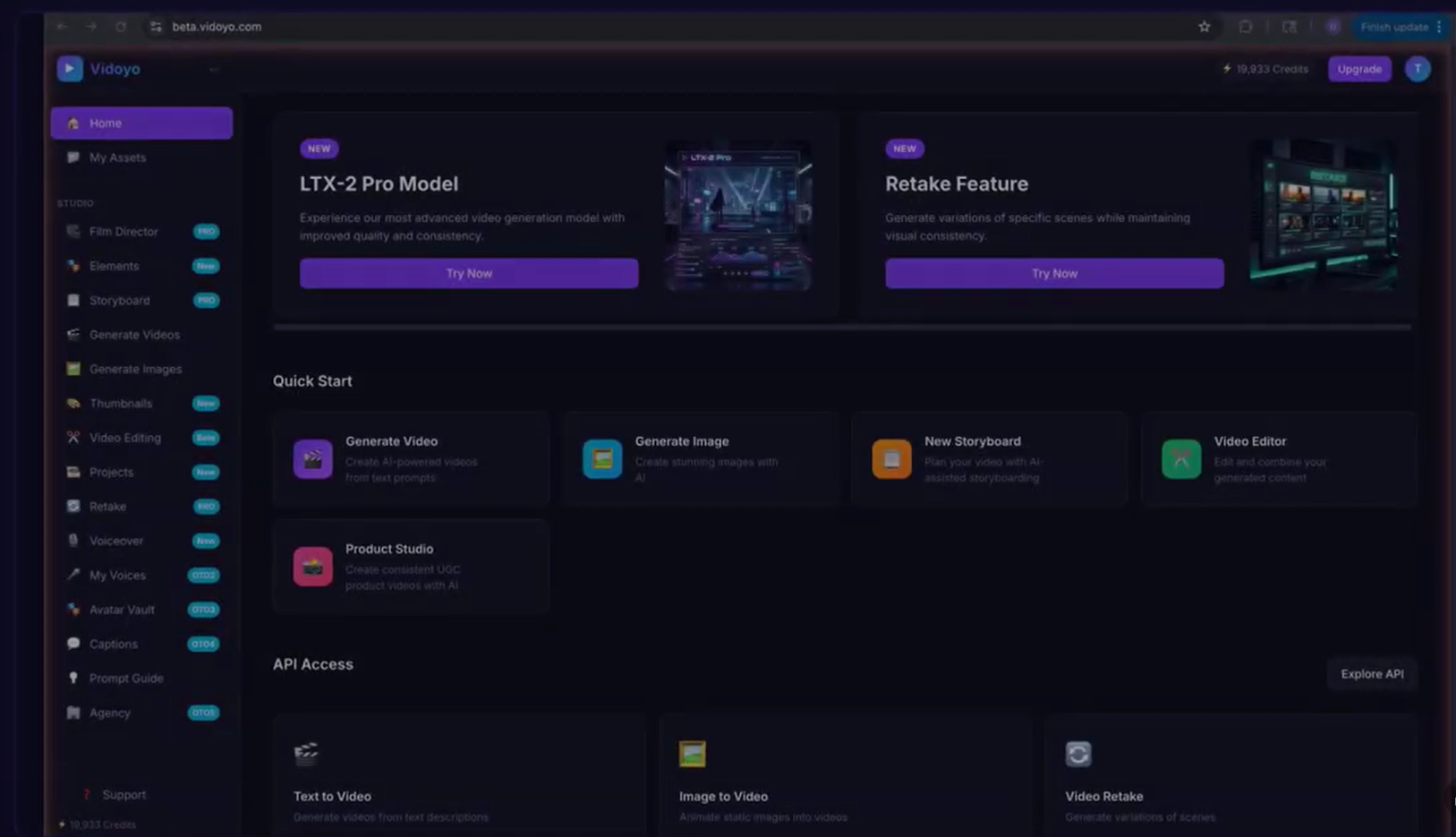
What makes Vidoyo interesting is not just that it creates video. It creates a full production workflow in one place. You can generate UGC-style ads, cinematic clips, faceless YouTube scenes, images, thumbnails, voiceovers, and even edit everything inside a built-in timeline. For creators, affiliates, media buyers, and agencies, that means less outsourcing, less waiting, and far more output.
In this review, I will break down what Vidoyo does, how it works, who it is best for, its strongest features, possible limitations, and whether it deserves a place in your content stack. If your goal is to make more videos in less time and turn creative speed into income, Vidoyo is worth a serious look.
What Is Vidoyo?
Vidoyo is an AI filmmaking studio built around a newer generation of video generation technology. Instead of acting like a simple prompt-to-video wrapper, it combines creation, editing, consistency, and publishing-oriented tools in one dashboard. The platform is designed to help users generate professional-looking videos from text prompts without needing a camera crew, spokesperson, editor, or motion designer.
The biggest selling point is speed. A concept that might have taken days of planning, filming, and editing can be turned into usable video content in minutes. That makes Vidoyo especially compelling for people who rely on volume, like advertisers testing multiple hooks, affiliate marketers making short-form clips, or agencies producing content for clients at scale.
Key Features of Vidoyo
1. AI Video Generation
Vidoyo’s core feature is its ability to convert text into video. You describe the scene, choose a style, and let the system generate content with camera movement, lighting, composition, and motion already handled. This is especially useful for users who want polished output without learning video production software.
- 4 AI video models: Fast, Pro, Draft, and Full quality
- Up to 4K resolution
- Up to 20 seconds per clip
- Multiple aspect ratios for different platforms
- 14 cinematic camera movements
- 8 visual styles including realistic, cinematic, anime, 3D, and cyberpunk
2. UGC-Style Talking Head Videos
One of Vidoyo’s most attractive features is the UGC creator. These are the authentic-looking talking-head videos that perform well in ads and social content because they feel like real people speaking naturally about a product. With Vidoyo, you can generate these clips from a script, choose from thousands of AI personas, and pair the result with premium voices.
For media buyers and affiliate marketers, this is a big deal. Instead of paying a creator hundreds of dollars for one test video, you can generate multiple variations and quickly identify which hook, face, or angle gets the best response.
3. Built-In Video Editing
Vidoyo does not stop at generation. It also includes editing tools that allow you to cut, trim, split, and organize content on a four-track timeline. That means you can manage both video and audio inside the same workspace without bouncing between separate apps.
- 4-track timeline with 2 video and 2 audio tracks
- Audio detachment from clips
- Drag-and-drop workflow
- Easy trimming and arrangement
4. AI Voiceover Studio
Vidoyo includes 48 premium voices, which makes it possible to add narration to your videos without recording your own voice. This is especially useful for faceless YouTube channels, product explainers, educational content, and ad creatives where the voice must sound clean and professional.
The voice options give users flexibility. You can create different tones and moods depending on the content, whether you want something upbeat for ads or more serious and trustworthy for tutorials and documentaries.
5. Thumbnail Generator
A good video often needs a good thumbnail to get clicked. Vidoyo includes an AI thumbnail generator that creates clickable visuals in several styles. This matters most for YouTube creators and marketers who want a faster way to package content for stronger engagement.
6. Consistency Tools
One of the common frustrations with AI content is inconsistency. A character can look different from scene to scene, or a visual style can feel random. Vidoyo addresses that with an Elements System that lets you save and reuse characters, objects, and places. It also includes a voice library so you can reuse voice settings across projects.
This may sound like a small detail, but it is one of the features that separates a playful toy from a real production system. Consistency matters when you are building a brand or telling a story over multiple clips.
Why Vidoyo Stands Out
There are plenty of AI video tools on the market, but many of them only solve part of the workflow. Some generate clips, but do not help you edit them. Others help you script or voice content, but still leave you needing outside tools to finish the project. Vidoyo stands out because it combines multiple stages of production into one system.
That means you can go from idea to final export with fewer interruptions. For busy creators, the biggest advantage is not just quality. It is momentum. If you can generate, refine, and export faster, you can test more concepts, publish more often, and improve your odds of finding winners.
Benefits and Use Cases
For Affiliate Marketers
Affiliate marketers can use Vidoyo to make product demos, review-style clips, and short-form social videos that promote offers quickly. This is especially effective for TikTok Shop, Instagram Reels, and YouTube Shorts where fast testing matters more than perfection.
For Media Buyers
Media buyers need volume. They need different hooks, different faces, and different angles to fight creative fatigue. Vidoyo supports that workflow by making it fast to generate multiple ad variants without having to book talent or reshoot from scratch.
For Faceless YouTube Creators
If you want to build a channel without appearing on camera, Vidoyo gives you a practical production path. You can generate clips scene by scene, add voiceover, edit everything in one place, and publish content that looks far more premium than basic slideshow videos.
For Agencies and Freelancers
Agencies and freelancers can use Vidoyo to fulfill client orders faster and potentially increase margins. Instead of coordinating an actor, voice talent, editor, and motion designer, one operator can generate the core deliverables inside a single platform.
For Small Business Owners
Small businesses often need promotional content but do not have the time or budget for traditional production. Vidoyo gives them a way to produce ads, explainers, social clips, and branded content without a filming setup.
How Vidoyo Works
The process is straightforward. You type a prompt or script, choose a style, select a voice or persona if needed, and generate the content. From there, you can make edits, add music, adjust the timing, and export the final video.
What makes this workflow powerful is its simplicity. Instead of managing five different tools and a complicated production timeline, you work inside a single interface. That lowers the barrier for beginners while also making life easier for experienced marketers who need speed.
Demo Video
Pros and Cons
Pros
- Creates videos from simple text prompts
- Includes UGC-style talking-head generation
- Offers built-in editing tools
- Comes with 48 premium AI voices
- Supports thumbnails, images, and multiple visual styles
- Useful for affiliates, creators, agencies, and advertisers
- One platform replaces several separate tools
- Good for high-volume content production
Cons
- AI results may still require prompt refinement
- Best results may take testing and iteration
- Users expecting full Hollywood-level production may need realistic expectations
- Video generation quality can vary depending on the prompt and style
Vidoyo Compared to Traditional Video Production
Traditional production is slower, more expensive, and harder to scale. If you want a spokesperson video the old-fashioned way, you may need to hire talent, write scripts, schedule shoots, edit footage, and revisit revisions multiple times. That can be effective, but it is not built for speed or experimentation.
Vidoyo is different because it is designed for output. You can make one version, then make ten more, then refine the winner. That is an important shift for marketers and content creators because modern platforms reward volume, variation, and consistency.
Real User Scenarios and Examples
Scenario 1: The TikTok Shop Marketer
A TikTok Shop affiliate wants to test five different angles for the same product. With Vidoyo, they create five UGC-style videos in one afternoon, post them across different accounts, and quickly identify which concept gets the best traction.
Scenario 2: The Faceless YouTube Builder
A creator wants to launch a channel about history and documentary-style storytelling. They use Vidoyo to generate scene visuals, voiceover, and editing for each episode. Over time, the channel grows without the creator ever appearing on camera.
Scenario 3: The Ad Agency
An agency needs a batch of fresh ad creatives for a client whose campaign is starting to fatigue. Vidoyo helps them produce multiple new concepts fast, which gives the media buyer more options to test and optimize.
Scenario 4: The Solo Freelancer
A freelancer wants to sell AI video services but does not have a production team. Vidoyo enables them to fulfill orders, create deliverables quickly, and present themselves as a modern video production provider.
Who Should Buy Vidoyo?
Vidoyo is best suited for people who need speed, variety, and an efficient content workflow. If you are a marketer, creator, or business owner who wants to publish more video without spending heavily on production, this tool is a strong fit.
It is especially attractive for users who value monetization potential. The platform is not only a content creator; it is a content output machine that can support affiliate campaigns, client services, ad testing, and faceless channel growth.
Is Vidoyo Worth It?
In my view, Vidoyo is worth considering if your success depends on creating a lot of video content quickly. Its real value is not just in generating clips, but in letting you move from idea to execution without a complicated or expensive production pipeline.
That said, it will not magically create winning content for you. You still need good ideas, strong hooks, and an understanding of your audience. But if you already know what you want to make, Vidoyo removes many of the practical barriers that usually slow creators down.
For people who are serious about volume, consistency, and testing, that can be a major advantage. The faster you can produce, the faster you can learn. And in modern content marketing, learning speed is often the edge that matters most.
Final Verdict on Vidoyo
Vidoyo is a compelling AI video platform because it is built for real-world output, not just novelty. It combines generation, editing, voiceover, thumbnails, and consistency tools into a single system that supports a wide range of creators and marketers.
If you are tired of clunky AI video tools that look fake or require too much patchwork to finish, Vidoyo is a refreshing step forward. It gives you a practical way to create more, test more, and potentially earn more from video content.
If your goal is to build a content factory instead of making one-off videos, Vidoyo is one of the more interesting tools in this space right now. And if you want to move before everyone else catches on, this is the kind of platform that makes that possible.